 Pipedeck
Your stream doesn't have to hear what you hear.
Pipedeck is a PipeWire mixer for Linux streamers, in the spirit of Elgato Wave Link. Send each application to a channel, then set how loud every channel is in each mix: your headphones, your stream and your call each get a balance of their own.
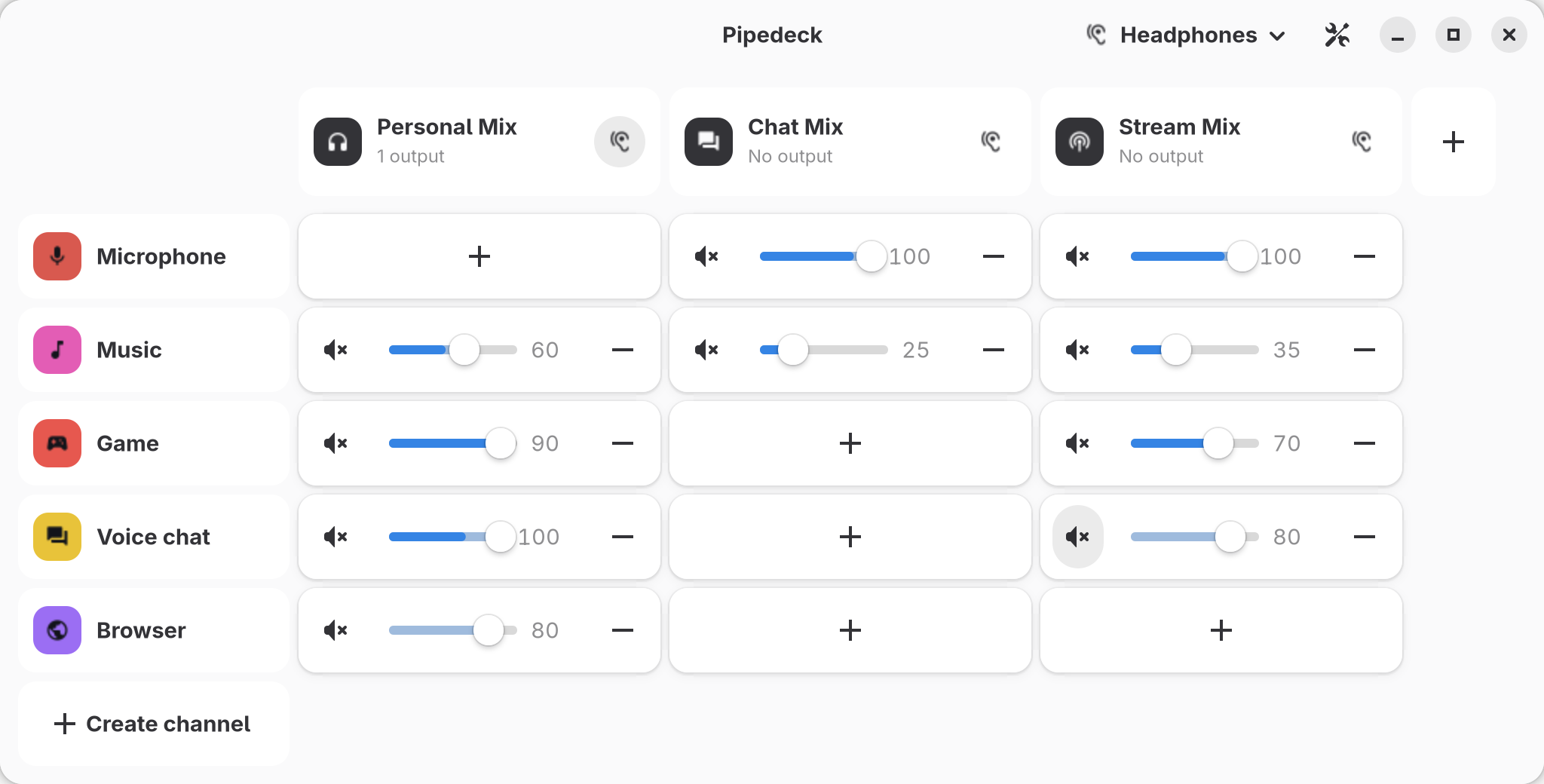
A sound desk for everything that plays.
A matrix mixer
Channels in rows, mixes in columns, and a fader and a mute in every cell between them. Up to five mixes: Personal, Chat, Stream, Record and Aux.
Apps go where you put them
Attach an application to a channel once, and Pipedeck moves its sound there whenever it starts playing.
Ready for OBS
Every mix is an input device named after it, so OBS, Discord or a browser list it with the microphones.
Meters everywhere
Every channel, mix and cell shows what it passes on, as it plays.
Follows your volume keys
A level is the volume of its PipeWire node, so a media key or the desktop's volume applet moves the fader too.
Keeps going
PipeWire or WirePlumber restarting? The mixer puts itself back together, and sends every application back to its channel.
Hear any mix
Pick which mixes play in your headphones: your own, or the stream's for a moment to check what your viewers hear.
Take your mixer with you
Export the whole mixer to a file, channels, mixes and effects, and import it on another computer or give it to a friend.
Out of the way
Close the window and the mixer carries on from the notification area, and starts with your session if you like.
A soundboard
Sounds play on a channel of their own, so its cells decide who hears them: you, the stream, the call. Play them from the mixer, a window of their own or a Stream Deck key.
Your Discord sounds
Take sounds from the soundboards of your Discord servers, through Vesktop, and play them anywhere, not only in a voice channel.
Keys that work in a game
Give each sound a keyboard shortcut in your desktop's settings: it plays with the window closed, or a game in front.
Rows are what you play into. Columns are what you record.
- Channels
- Where sound comes from: a virtual output any application can pick, or a microphone.
- Mixes
- Where sound goes: an input device for OBS or a call, which can also play to your headphones.
- Cells
- Link a channel to a mix, with that pair's own fader and mute. A cell exists only once you add it.
Treat a voice once, and every mix hears it.
Noise suppression takes fans, keyboards and hiss out from behind a voice.
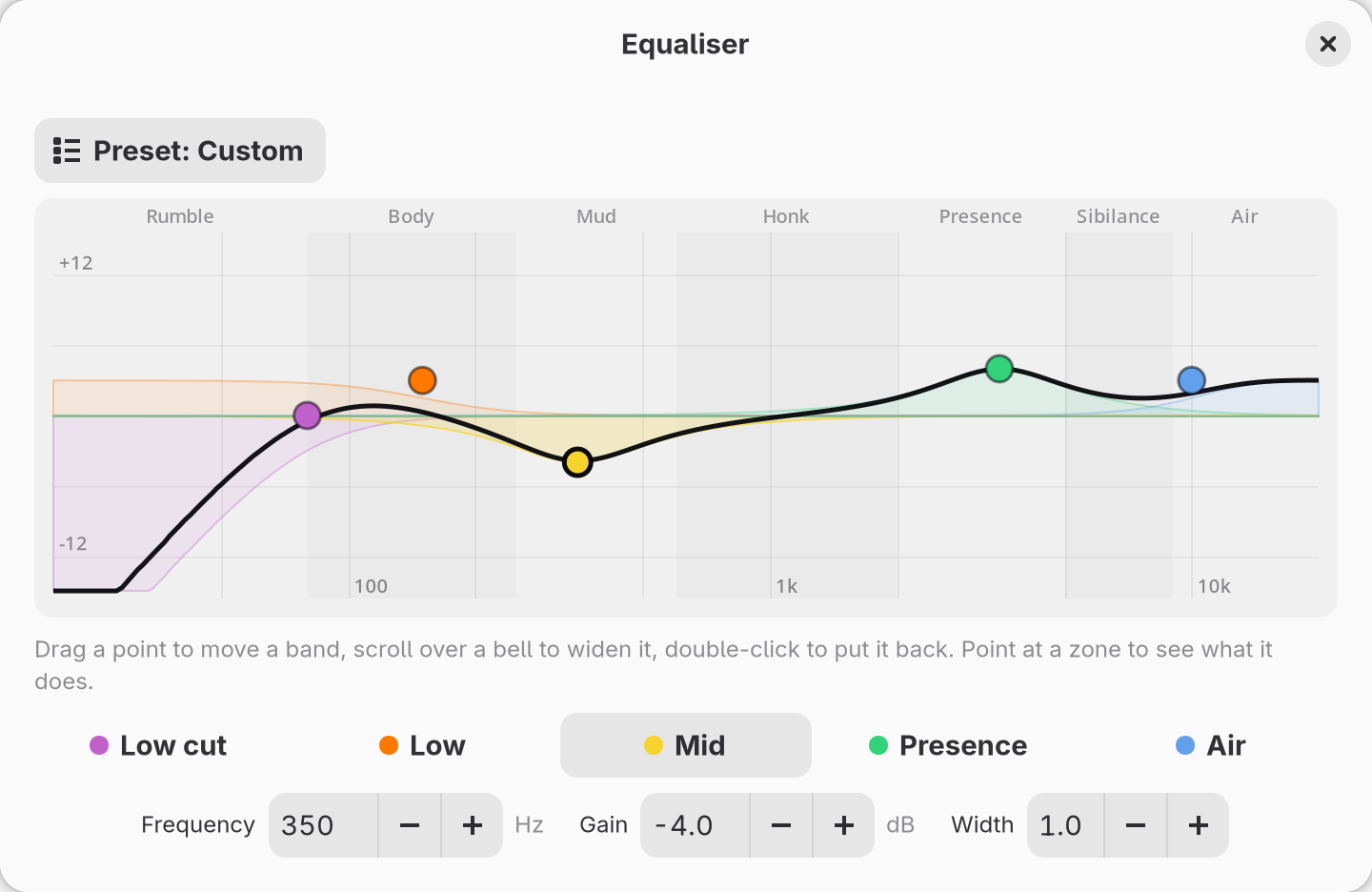
Equaliser with five bands shaped for a voice, set by dragging them on a curve.
De-esser turns down harsh s sounds, and learns where yours are.
Compressor evens out loud and quiet moments, set from five seconds of your voice.
Built in, nothing to install. VST3 plug-ins and Thimeo's Stereo Tool run on a channel too.
On your Stream Deck, and in your calls.
Stream Deck
Mutes, levels, the mix in your headphones, effects and more on keys and dials, drawn the way the mixer draws them, meters and all. Through OpenDeck or StreamController, with ready-made layouts for the Stream Deck, Stream Deck + and XL.
Discord, one voice at a time
With Vesktop, a Discord call unfolds into a sub-track per person, each with a level and a mute of their own, remembered for the next call. Start a call and Pipedeck puts Vesktop on your voice chat channel by itself.
Get Pipedeck.
Download a package from the latest release. Pipedeck needs GTK 4.18, libadwaita 1.7 and PipeWire 1.2 or later.
.deb
Debian 13, Ubuntu 25.04 and later
sudo apt install ./pipedeck_*_amd64.deb.rpm
Fedora 42 and later
sudo dnf install ./pipedeck-*.x86_64.rpmAppImage
Other distributions with glibc 2.41 or later
chmod +x Pipedeck-*-x86_64.AppImage
./Pipedeck-*-x86_64.AppImageFlatpak
Any distribution, kept up to date with your other apps. Or install it in one click.
flatpak remote-add --if-not-exists 2c2t \
  https://flatpak.2c2t.dev/2c2t.flatpakrepo
flatpak install 2c2t dev._2c2t.PipedeckFrom source
With PipeWire, GTK, libadwaita and libopus headers, clang, pkg-config and Rust 1.92 or later:
git clone https://github.com/2c2t-dev/PipeDeck.git
cd PipeDeck
cargo build --release
./target/release/pipedeck